
📖 Inhaltsverzeichnis
Grundprinzipien der Stimmung
- Physik der Zinken: Längere Zinken erzeugen tiefere Bassnoten; kürzere Zinken erzeugen höhere Höhen.
- Tippen nach unten (Verlängern): Um die Tonhöhe zu senken (einen scharfen Ton korrigieren).
- Tippen nach oben (Verkürzen): Um die Tonhöhe zu erhöhen (einen flachen Ton korrigieren).
Der Kalimba, auch Daumenklavier genannt, erzeugt Klang durch die Schwingung der Metallzinken. Diese Zinken sind am Kalimbakörper befestigt, mit unterschiedlichen Längen, die verschiedene Töne erzeugen. Längere Zinken, meist in der Mitte, erzeugen tiefere Bassnoten, während kürzere Zinken an den Seiten höher klingende Töne produzieren. Eine korrekte Stimmung ist entscheidend für die beste musikalische Performance.
Dieses umfassende Handbuch erklärt jeden Schritt im Detail, einschließlich häufiger Herausforderungen und Profi-Tipps für eine präzise Stimmung.
1. Was Sie benötigen
Vor Beginn sammeln Sie diese essentiellen Werkzeuge, um Genauigkeit zu gewährleisten und den Stimmvorgang reibungslos und effizient zu gestalten:
- Kalimba: Das Instrument selbst (17 oder 21 Tasten).
- Stimm-App: Eine Smartphone-App, die Tonfrequenzen und Noten erkennt (z.B. Pano Tuner, Tunable).
- Stimmhammer: Ein kleines Metallwerkzeug, das speziell zum Tippen der Kalimbazinken entwickelt wurde.
- Kalimba-Stimmtabelle: Ein Referenzleitfaden für die korrekten Noten und Frequenzen.

2. Schritt 1 & 2: Messen und Vergleichen
Öffnen Sie zuerst die Stimm-App auf Ihrem Telefon und platzieren Sie Ihre Kalimba in der Nähe des Mikrofons des Telefons.
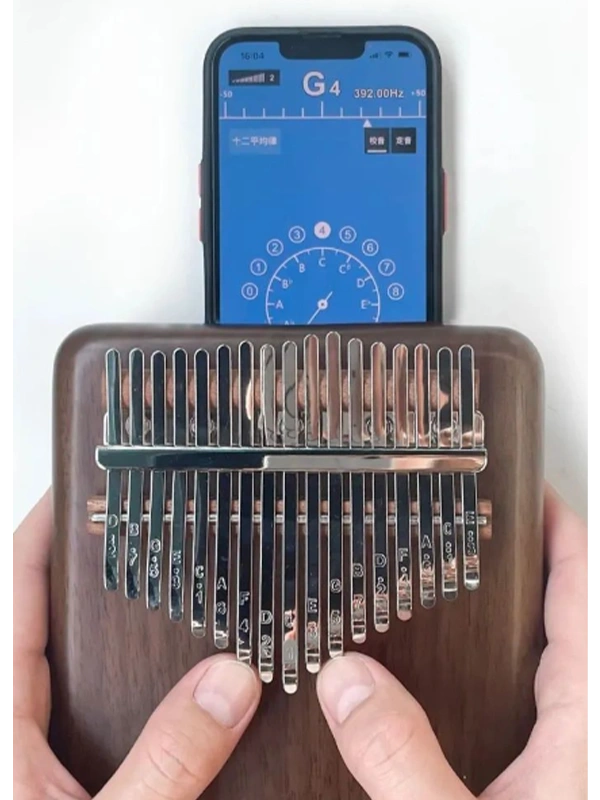
Beginnen Sie, die Zinken mit Ihrem Daumen zu zupfen. Starten Sie beim mittlere Zinke und arbeiten Sie symmetrisch zu den Seiten hin. Diese Reihenfolge ist wichtig für Konsistenz und Organisation.
Stellen Sie sicher, dass die App den Klang jeder Zinke genau erfasst, indem Sie die Kalimba ruhig halten, um Hintergrundgeräusche zu minimieren.
Vergleich mit der Tabelle
Überprüfen Sie die Anzeige der Stimm-App, um die gespielte Note zu identifizieren, und vergleichen Sie sie mit Ihrer Tabelle.
Pro Tipp: Wenn die App instabile Anzeigen (Noten schwanken) zeigt, beziehen Sie sich stattdessen auf die Frequenzwert Beispielsweise sollte eine Standard-A4-Note eine Frequenz von 440 Hz anzeigen.
3. Schritt 3: Mit dem Hammer einstellen
Dies ist der wichtigste Schritt. Sobald Sie die Abweichungen erkannt haben, verwenden Sie Ihren Stimmhammer, um die Zinken physisch zu bewegen.
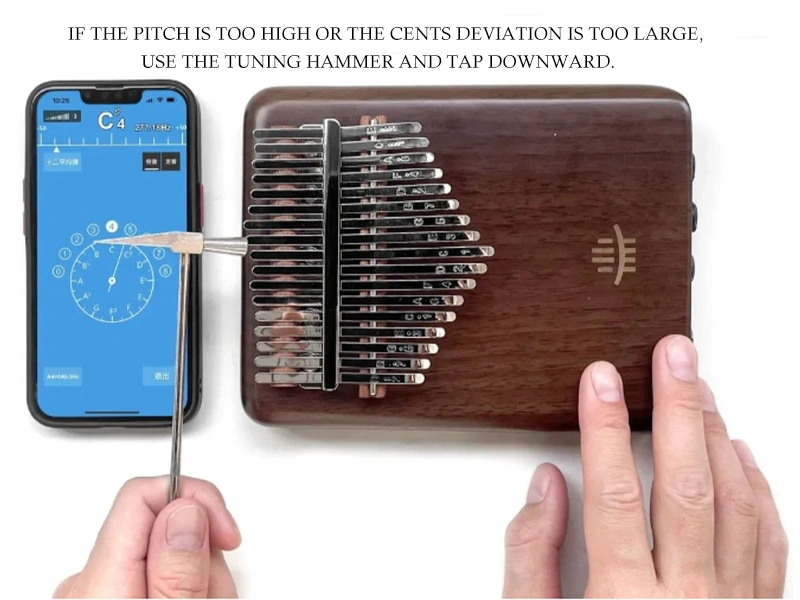
Verwenden Sie den Stimmhammer, um die Spitze des Zinks nach unten zu tippen. Dies erhöht die Schwingungsdauer des Zinks und senkt die Tonhöhe.
Wenn die Note zu NIEDRIG ist (Flach b)Tippen Sie auf den unten des Zinks nach oben. Dies verkürzt den schwingenden Abschnitt und erhöht die Tonhöhe.
Schnelltest für Anfänger: Die Noten der Kalimba folgen der C-Dur-Skala (C, D, E, F, G, A, H). Wenn die App eine Note anzeigt, die früher in dieser Sequenz liegt als erwartet, ist der Ton scharf. Wenn später, ist der Ton flach.
[[VERWANDTE_PRODUKTE]]4. Schritt 4: Fehlerbehebung bei häufigen Problemen
Auch mit der richtigen Technik können akustische Herausforderungen auftreten. So lösen Sie sie:
- Mitwirkende Schwingungen: Nahegelegene Saiten können vibrieren, wenn eine Note gezupft wird, was zu falschen Messwerten führt. Um dies zu vermeiden, drücken Sie die angrenzenden Saiten beim Stimmen vorsichtig mit den Fingern, um sie stumm zu schalten.
- App-Empfindlichkeit: Einige Stimm-Apps haben Schwierigkeiten in lauten Umgebungen. Stimmen Sie immer in einem ruhigen Raum ab.
- Große Anpassungen: Wenn eine Saite deutlich verstimmt ist, nehmen Sie schrittweise Anpassungen vor (kleine Klopfbewegungen), um Überkorrekturen zu vermeiden.
5. Schritt 5: Feinabstimmung & Überprüfung
Nachdem Sie jede Saite angepasst haben, wiederholen Sie den gesamten Satz. Zupfen Sie jede Note und vergleichen Sie sie mit dem Stimmdiagramm. Bestätigen Sie, dass alle Noten sowohl im Namen als auch in der Frequenz übereinstimmen.
Zusätzliche Wartungstipps:
1. Regelmäßig überprüfen: Mit der Zeit können sich die Saiten durch Spiel oder Lagerbedingungen leicht verschieben.
2. Nicht zu fest anziehen: Wenn Ihr Kalimba verstellbare Schrauben hat, stellen Sie sicher, dass sie fest, aber nicht abgenutzt sind.
Fazit
Das Stimmen eines Kalimbas mag anfangs herausfordernd erscheinen, aber mit Übung und den richtigen Werkzeugen wird es zu einem einfachen Vorgang. Wenn Sie diese Schritte befolgen, stellen Sie sicher, dass Ihr Kalimba die schönen, resonanten Klänge erzeugt, für die es gemacht ist. Machen Sie das Stimmen zu einem festen Bestandteil Ihrer Kalimba-Routine, und Sie werden ein Instrument genießen, das immer sein Bestes gibt.